Saturday, March 23, 2013

Tact good for tweeter alignment

While I have concluded that the low frequency resolution of the Tact 2.0 measurement program (or more precisely, the display of the measurement program, but it might be the program itself, because of the type of pulse it uses and the number of bins) doesn't work well for subwoofer time alignment.

But it works very well for supertweeter time alignment.  A tone burst (which may be partly digital artifacts) appears in the supertweeter channel.  And using two channels is fine, I was wrong about the delay being auto-adjusted to make the leading edge of the tweeter signal line up with the leading edge of the Acoustat signal.

After the first measurement, it appeared that the supertweeter was lagging by about 0.16 ms.  So I adjusted that exactly (for some reason, I used the "short time delay" menu in the Behringer) in the right channel and got this picture, where white is the tweeter and yellow-orange is the Acoustats:
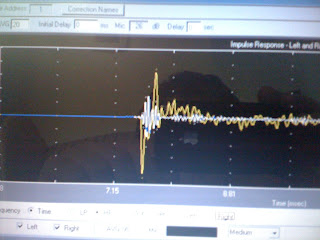

Yes, for some reason the leading edge of the acoustat signal appears to go down, out-of-polarity.  But I believe the main part of the pulse is what follows, and it goes up.  I still don't understand this.  But looking at the above picture you see that I have lined up the leading downward pulse from the panels with the leading edge of the squiggly burst from the super tweeter, which might go up (depending on which pixel you look at, some of the leading edge of the tweeter signal looks like digital artifact pre-ringing which can be ignored.  So I ignored tiny pixels, but chose the first decent looking line as the leading edge, which I admit is a judgement call.)  There is a bit of ambiguity here as to where the tweeter signal really starts, but we are within a few 0.01 ms here.  When I started, the tweeter burst was half way further down the screen, and that was a mere 0.16 ms difference.  For absolute perfection here, a better measuring device and/or listening may be required.

After doing the above measurement, I realized that the two supertweeters were not correspondingly positioned for the two panels.  I would have to adjust the other one to match this one.  But then it also occurred to me it might be better to push out both supertweeters all the way, so that the front edge of the stands for supertweeters line up with the stands of the Acoustats they are next to.  There is nothing magic about getting the two stands to line up, but it is a more reproducible positioning than most others (except having them line up on the back side) which is helpful for practical reasons.  I often move one or both supertweeters out of the living room for  parties.  If I have them calibrated for any particular position, it helps to make that position an easily reproducible one.

And since I am adjusting the delay anyway, I don't have to time align the positions of the two speakers for the reason people not having digital systems must.  I can choose to optimize the relative position of the panels and supertweeters for other reasons than actual time alignment.  In addition to the reproduciblity issue described in previous paragraph, there are also issues related to dispersion and diffraction.

Basically you don't want the supertweeter firing from behind other speakers, inside a hole as it were, because it's like talking through cupped hands.  If the tweeters are actually slightly forward of the Acoustats, that is helpful in reducing edge diffraction related to the sound projected by the supertweeters.  On the other hand, it could increase edge diffraction related to sound eminated from the Acoustats.  But that doesn't matter as much here for several reasons, the most important being that as a figure 8 speaker the acoustats don't signficantly project sound to the hard right or left, that's a null.  For another, the supertweeters are omnidirectional, which is exactly the opposite, they will product loads of diffraction and other undesirable addition effects when there are nearby boundaries.  Plus, one takes advantage of their omnidirectionality if they are slightly forward of the other speakers, getting more that 180 degrees of free radiating angle directed toward the user rather than in the other direction.

So I moved both the supertweeters out like that, and calibrated both channels like the above for correct time alignment achieved by digital delay.

I listened a bit to radio, KRTU because KPAC was playing opera, and the new setup is wonderful.  Somehow it is both more transparent, more spacious, and more relaxed.  I can also move my had a bit either way without the image seriously distorting, instead the image shifts gradually as I move my head.  This is all to the good, and I think having the supertweeters moved out and time aligned digitally is a big improvement, and a successful day's work.


Using the Tact to adjust crossover time delays

At long last I'm firing up the living room Tact 2.0 program (which runs on a Windows PC) to adjust the time delay that time aligns my Acoustat panels and SVS subwoofers.  I am looking at frequency response too.

Unfortunately for me the Tact program is oriented around room correction (not really measurement) so much that it's unclear to me whether the impulse shown after measuring my system is a full cycle (0, +1, -1, 0) because the tact is simply showing what it recorded, an image of its own test signal, or whether it shows a full cycle because of group delay in my Acoustat speaker, and if the Acoustat had no group delay the Tact would be showing a standard impulse that goes from 0 to +1 and then back to 0.  When I use the Liberty Audio Suite, it plays a signal that looks nothing like a simple pulse, but LAS then mathematically transforms it into a perfect step pulse graph if indeed the unit being tested has perfect pulse response (as most solid state electronics does, or comes close to, while speakers are usually far from it). I think that's called deconvolution, but it might be called convolution (I get the two confused).

Worse, I had a specific idea for adjusting the time delay between the Acoustat panels and the subs.  I reversed the amplifier connections for the acoustats.  Then I mute every speaker driver except the Left channel Acoustat (which is actually playing on the right, because I reversed them) and the right channel sub.  Then when I run Tact in full stereo mode, it plays both drivers for the right channel but as if they were left and right full range speakers.  Then, in principle, I could verify and adjust time delay, by comparing the onset of left and right channels in the impulse picture the Tact produces.

However, because the Tact is so oriented around measurement, it uses some trigger to put both channels into alignment even if they are not.  Or at least that is what it seems.  Whenever I do this measurement, the bass looks like it starts about 6.0 ms (millisecond) later than the panels.  Which is very strange because the speakers are only about 3 feet apart, and I was already applying about 3.4 ms of delay to the panels to compensate.  So the expected error, or difference, should have been less than 1 ms.  But as this measurment appears, there is also a box showing the relative time difference between the channels (which the Tact is compensating for).  And it shows a really big number, like 20 ms.  So once again I don't know what the impulse picture means.  Is it showing the raw measurement before the 20 msec correction it is ultimately applying in the chosen correction number?  Or is it showing the two channels adjusted, as it thinks they should be?  If it is showing them after correction, I can't use this measurement.

Because the Tact seemed to be showing about a 6ms gap with the subs starting later, I increased the time delay on the panels, but for some reason I don't now remember, or possibly just lapse of memory, I increased the delay adjustement (in the Behringer 2496 DEQ) for the Acoustats from 2.47ms to 5.53ms.  I would have made the second 5.47 but the adjustment is course and that exact number is not available.  Anyway, that seemed to have little effect on the graph.

So then I tried bigger adjustments, 9ms, 12ms, 10ms, and in every case it wasn't clear whether it made the bass alignment with the treble impulse better or worse.  Those numbers made no sense at all, the required delay should be between 1 and 4 ms.  But in every case it still looked like 8-12 ms of additional adjustment was needed.

One problem is that the bass may start more slowly, for various reasons, especially the crossover, but also it's limited high frequency response.  It should, I believe, begin moving the instant current is applied, but at first slowly, then building up to a full wave.  The resolution of the display is low enough, and there is also noise, so it is ambiguous where the subwoofer output really begins.

After messing around with the primary "Measurments and Correction" page for hours, the only one that actually allows you to do measurments (and you must have a non-bypass correction number selected, it won't let you do measurments in bypass mode) I finally went over to the dual-domain page, where you can load the previously made measurement, and there it seemed I could get a pretty clear image of the treble impulse, and see that it started around 11.8 ms in the right channel.  (This was with all crossover settings restored to original settings.)  Then I played the bass.  Well, it could have been correct, you could see some rising, maybe, in the bass response at 11.8 ms, where the red line is in the graph below.  But it could also be as fast as 2ms, or as slow as 15 ms, it's hard to be sure, because there is noise and the initial start might be slow, very slow.  True, at about 15 ms it really starts going, it's clearly going at that point, though not as strong as later, there's a cycle of reduced output before the full response builds, it's typical for speakers, especially bass speakers being crossed over, to respond that way.  I have to think that on a higher resolution plot, the very initial slow part, corresponding to the limited high frequency response of the subwoofer, there would be a more clearly visible starting point, and it would be very close to the red line at 11.8 ms, because I was already compensating for the delay with digitial delay in the crossover which should have been accurate to a few inches, which would correspond to about 0.1ms or so, because sound travels 1foot in about 1 ms.  On the other hand, frustratingly, I can't be sure, because it may well be that even with the crossover and all filters in the SVS subwoofer turned off (as usual, except the sub 15 Hz filter I am required to run with only one port filled) there is time delay in the electronics, that's different between the sub amp and the acoustat amp.  I can't explain that much difference in delay happening from analog elctronic processing.  I can explain the 11.8 ms delay as about 6 ms from distance to the microphone, and about 6 ms fixed in the digital processing from the output of the Tact through the Behringer DEQ.  But that should not vary between the treble and the bass.

Anyway, as the graph below shows, the Tact measurement system is useless for setting the delay on the bass, because the starting point of the bass is ambiguous with such limited resolution.  And the graph below was made with crossover turned off, and the bass does have HF response to about 300 Hz, so I think a good measurement system would clearly show the starting point better than this.  Part of the problem here...the Tact has a simple impulse that has limited low frequency information, hence, limited low frequency resolution.  A Maximum Length Sequence system, like liberty audio suite, uses chirps, which have a better spectral distribution than clicks, allowing greater bass resolution.


Sunday, February 3, 2013

New System Picture


Tuner Switcheroo

Kenwood L-1000T 2nd from bottom
On the night of Friday February 1st it was becoming clear that I was hearing distortion from the Kenwood L-1000T quite frequently, not just on certain bass heavy programs like Pipe Dreams.  It still does seem that usually the distortion, which has a garbled clipping sound that persists for a few seconds, is usually triggered by audible low bass.  But sometimes it occurrs even when there is no audible bass.  I reason that there might be subsonic bass that is triggering it then, but this is all guessing. Guessing further, I suspect this is being caused by a power supply droop or decoupling capacitor failure.

On February 2nd I did some careful testing to confirm that the distortion is coming from the Kenwood itself, and not my incredibly complicated setup, especially for whole-house listening through Sonos--I actually do most of my listening on kitchen system which has Sonos box. I send L-1000T variable output to a Lavry AD10 which converts to 24/96 digital, then to a Behringer DEQ 2496 for EQ correction, then in analog to Sonos which digitizes again for whole-house distribution.  When I'm listening in the living room, I take the digital output from the Behringer straight into my Tact preamp so no analog re-conversion is necessary.  To bypass much of this, I took variable (and then fixed) output from the Kenwood into the Lavry, then to the Tact, doing the corrective EQ in my DCX 2496 crossover.  So I never did bypass the Lavry, which I believe is working fine.  Analog sources has to be converted to digital somewhere for my living room system to work.  I trust the Lavry, though in a quick online search on Saturday night I was unable to find the input impedance of the Lavry and I had been worried it might be too low, something like 600 ohms, though I believe it is more likely to be 10k ohms or higher.

At first, it seemed like the distortion was not occurring on the Living room system with Berhinger DEQ bypassed.   Strangely, I first noticed the distortion when I was listening to the living room system while in the hallway.  The living room system is so transparent, it actually minimizes certain kinds of distortion.  When I did finally hear the distortion, it seemed briefer and relatively softer.  I sat down and listened to L-1000T in the living room for about an hour, by which time the intermittent distortion was unambiguous.

So I removed the Kenwood from my left hand stack, stashing it in the master bedroom for later investigation and repair.  Meanwhile, my motto is that the symphony must go on, so I brought out spare replacement tuners.  I first hooked up the Kenwood KT-6040, a tuner I thought was one of the best a couple years ago.

Switching from L-1000T, the sonic inferiority of the KT-6040 was all too apparent.  I was so disappointed at first I toyed with bringing back the L-1000T and just ignoring the distortion.  But that distortion gets on your nerves after awhile, you find yourself cringing when you expect it, and the L-1000T needs repair before it gets any worse.

The KT-6040 is equally quiet, but lacks the depth and spatial and harmonic realism the L-1000T has.  It sounds as if the 3D reality of the L-1000T is chopped up into tinfoil panels, one for each musical instrument.  The tinfoil panels are placed in front or back of each other, giving some kind of depth, but nothing like reality.  At the same time there is a cotton-ball like fuzziness to everything, even though there is no lack of highs, maybe even slight excess, but the worst is that the highs seem slightly disconnected from their fundamentals.

I was so disappointed with the KT-6040 sound I brought out the Pioneer F-26.  I'm not sure my F-26 is operating correctly because the "Wide" light never lights up for any of my favorite stations, if at all.  But nevertheless, the F-26 had a far more listenable presentation, a greater sense of coherency and consistency.  The F-26 is also rolled off a tad and perhaps slightly less transparent than the KT-6040, but far more pleasant to listen to, especially in the ultra transparent living room system.
KT-6040 2nd from bottom, F-26 3rd

So I decided on a hybrid hookup, with F-26 hooked through Lavry to play only in the living room, and KT-6040 hooked up through Behringer (using the Beringer A/D conversion also) to play in other rooms through Sonos.  The 6040 sounds OK through Sonos, maybe even better than direct because the highs are slightly tamed.

When I bought the KT-6040, and even the L-1000T I figured I would have a dual tuner setup like this. I had not figured on the L-1000T trouncing my F-26 sonically and therefore being able to play both roles.

Because the remote I have been using with the L-1000T is actually a KT-6040 remote, I was actually able to control more functionality on the KT-6040 than with the L-1000T.  For the first time, I was able to do tuning scans to find new stations.  I spent some time doing that on Saturday night into Sunday morning, checking out some new rock stations.

[Note: the ISOMAX transformer and Classe CP-35 preamp in the left stack are used with my Kurzweil K2661 keyboard.]

Friday, January 18, 2013

Hickok Tube Testers

I have two Hickok tube testers, a Cardmatic model 123A, which has been my old standby since 1980, and a Model 6000, which I've never used (because I have the Cardmatic, which is cooler).

Unfortunately, my 123A has several problems.  It has a horrible AC leakage problem, I get around this by connecting it to a GFCI strip and not connecting the ground.  If I forget it's leaky and touch any  metal part, the GFCI triggers instantly.

I should get that fixed...

But right now the problem is that it stinks.  It has some kind of mold problem, or cat spray, or dead rat inside, or something.  I've moved it to my new very well sealed and climate controlled storage building, and I was able to keep it from stinking up the place by putting a blanket over it.  But eventually the blanket will pick up the smell, and then....

Girlfriend immediately says "get rid of it."  I try to explain how important a piece of gear this is.   I say "in top shape it would be worth $1000 or more."  Unfortunately, in the shape mine is in now, it might not be worth much for sale.

But arguably I might do fine by selling the 123A as-is on ebay and just using the 6000.  I bought the 6000, in fact, as a backup unit.


Sunday, December 30, 2012

Adapter required for Euro L-1000T

The European Kenwood L-1000T (and I get the feeling that most of them sold in Europe, as FM was out-of-fashion when the fantastic L-1000T was introduced) requires this particular adapter, or so it seems right now:

PAL Male to F-Connector (Coax) Female
Radio Shack #278-261

"PAL adapter" for short.

Unfortunately, after adding a second adapter to the B input, the B input still cannot be selected.  I'm not sure if this is because I don't have the correct remote, I was thinking it would auto-select the B input if stronger, but I couldn't find any station where that happened.


Wednesday, December 26, 2012

Remote Control for FM in every room


When my 4 day Chrismas holiday began, I had only one remote for controlling my wonderful Kenwood L-1000T FM tuner, and it only worked in the living room aimed in a very tricky way at the actual L-1000T because of how it is tucked behind the speaker.  I had to reach and wave the remote until it finally worked.  I did have a learning programmable remote control that I had never gotten to work, and another brand name programmable remote still in it's packaging.  Without remote control, it's is not desireable to scan FM channels but rather simply to keep it fixed to just one favorite, which can get boring particularly over a Christmas holiday...

Now I have easy remote control of the L-1000T in the living room, and in the bedroom and kitchen as well, through my network of remote control extenders.  Remote control extenders receive a remote control infrared signal in one room, send it via radio signals to another room, and then transmit the infrared signal toward the equipment that is to be controlled.  Most of the ones I use are from Radio Shack and they are small black rounded pyramids with short antennas.

And now I also have two working remotes, one being the Sony RM-VL610 learning programmable remote that had never worked before (now I can't find the unopened one).  I've spent much time listening to different stations in bedroom and kitchen.  With just one control, it is almost always in the wrong room, but with two remote controls I can have one in kitchen and one in bedroom, so they are always there, I don't have to remember to carry it with me.

The trick was finding the instruction manual to the Sony learning remote, and successfully getting it to learn the L-1000t remote codes.  Even with the instructions, it was tricky because the instructions themselves are not very clear in parts.  It's often unclear when you simply press buttons as opposed to holding them, or vice versa, and when you are supposed to let go.  In fact, in one particular case, you are supposed to hold a button, and the manual just says "press" and not "press and hold" but if you read to the end of the section, in the Notes section it tells you that you are really supposed to "press and hold".  Actually, it works either way, most of the time, which makes things even more confusing.

Once I had programmed the remote, which I was doing in the kitchen, I found it worked through the kitchen wireless remote receiver.  And then I tested it using the bedroom, and voila, the programmable remote actually worked better in the bedroom than the actual Kenwood remote.  So I could use the Kenwood remote in the Kitchen (or living room) and the Sony in the bedroom.  I then found I could program buttons on the Sony to control the HDMI switch in the kitchen (something that I had tried but never been able to do before) and also the Samsung TV in the bedroom (another thing that I had tried but was never able to do before).  So I'm on my way toward being able to use this programmable remote to control many things, making bedroom remote control life in bed far easier.

One other thing I had to do before I made any progress was to re-orient the remote control transmitter in front of the L-1000T.  The current orientation of the L-1000T and the remote extender are shown in the photo above, the remote extender is in the lower left corner on top of a pile of collectable Allied Radio catalogs which boosts it to the correct height.  Sometime in the past few weeks I had been trying to remote control the L-1000T directly, thinking the remote extenders were not letting me get at all the obscure functions.  So I had angled the L-1000T badly for the remote transmitter so it was not working at all.  So I had to do a lot of fiddling with the angle of the Kenwood and the angle of the remote transmitter to get it to work again.  It mostly didn't work from the bedroom, but it did work from the kitchen, after much fiddling.  I tried attaching a bunch of tie slips to the antenna on the transmitter to make it work better in the bedroom, but that approach didn't help.  I was finding I could use the Kenwood remote in the bedroom so long as I as standing right next to the bedstand light in a particular spot.  As inconvenient as this was, at least it verified that the remote control extenders were working correctly.  It took using the Sony programmable remote for reliable and easy bedroom operation.  One can guess that the Sony programmable remote puts out a higher signal level than the Kenwood remote, and that makes it work better through wireless extenders.  Or, perhaps it puts out a "clarified" signal with exaggerated on/off edges, the kind of thing you get when you use a "sharpness" control on some TV's.

A learning programmable remote is absolutely required for this application.  Programmable remote controls with a bunch of presets never or almost never have settings for extremely rare components like the Kenwood L-1000T tuner.  But since preset types are much easier to use than learning types, preset remotes have mostly driven learning remotes off the shelves.